Here is the thing about cash that took me a while to appreciate as an engineer: it does not automatically explain itself.
A card transaction leaves a trail. Payment reference, terminal response, processor record, settlement report. If something goes wrong, there is a clear audit path to answer the question: what happened to the money?
Cash sits in a drawer. It changes hands. It can be counted, but the system does not know what it should be unless you design that in.
That was the problem I was brought in to solve for a 24/7 POS environment running on always-on kiosk devices. And what started as "show a modal to record opening cash" turned into something more interesting — a small but complete accountability system that had to stay correct across configured business-day boundaries, browser sleep cycles, fast logout-login races, and the kind of edge cases that only show up when software runs continuously in a physical environment.
This is how I built it.
The Problem With Cash
In most digital payment flows, accountability is a given. The payment provider confirms the transaction, the backend records it, and the system can reconcile everything later without any deliberate effort from the frontend.
Cash needs intentional structure.
Without it, a POS might know "cash was used" but not know whether the drawer started the day with 200, 500, or 0. It cannot tell whether the expected closing amount is realistic. And when there is a discrepancy at the end of the day, the business is left guessing — was it a mistake, a process issue, or something that needs investigation?
The core requirement was simple to state:
Before the business starts accepting cash for a new business day, the POS must record the drawer's opening balance.
Once the opening balance is known, every cash movement becomes part of a traceable chain:
Opening balance
  + cash sales
  + cash in
  - cash out
  - refunds / corrections
  = expected drawer amount
This does not eliminate human error. But it creates a system of record that makes the drawer explainable — and that is the difference between a business that can investigate discrepancies and one that can only shrug at them.
The Constraint That Made It Interesting
The most important design constraint was not the modal. It was the operating calendar.
The client did not treat a calendar day as the accounting boundary. Their POS needed a configurable business-day session that could roll over at an operationally defined point, separate from the device's local clock and separate from a simple midnight reset.
The implications are easy to underestimate:
- Before the configured boundary, the POS is still operating in the current business session.
- At the boundary, the old cash session must end.
- After the boundary, the next login must verify whether opening cash has been recorded for the new session.
Add to this: the devices are kiosk-style, intended to stay on for days at a time. They may not be restarted between operating sessions. Test devices may use a different local clock configuration than production devices. Browser timers can be throttled when the screen is inactive.
That ruled out naive approaches immediately.
// This looks fine. It is wrong.
matchesConfiguredBoundary(new Date())
This uses the device's local timezone. It would work on one machine and silently break on another. The business cared about a configured operating timezone — including its calendar rules — not whatever timezone the operating system happened to be configured to.
So the first engineering decision was a principle:
The operating calendar is product logic, not a formatting detail. It belongs in configuration and application logic, not inherited from the device.
The Design Principle I Built Around
Before writing any code, I set one constraint that shaped everything:
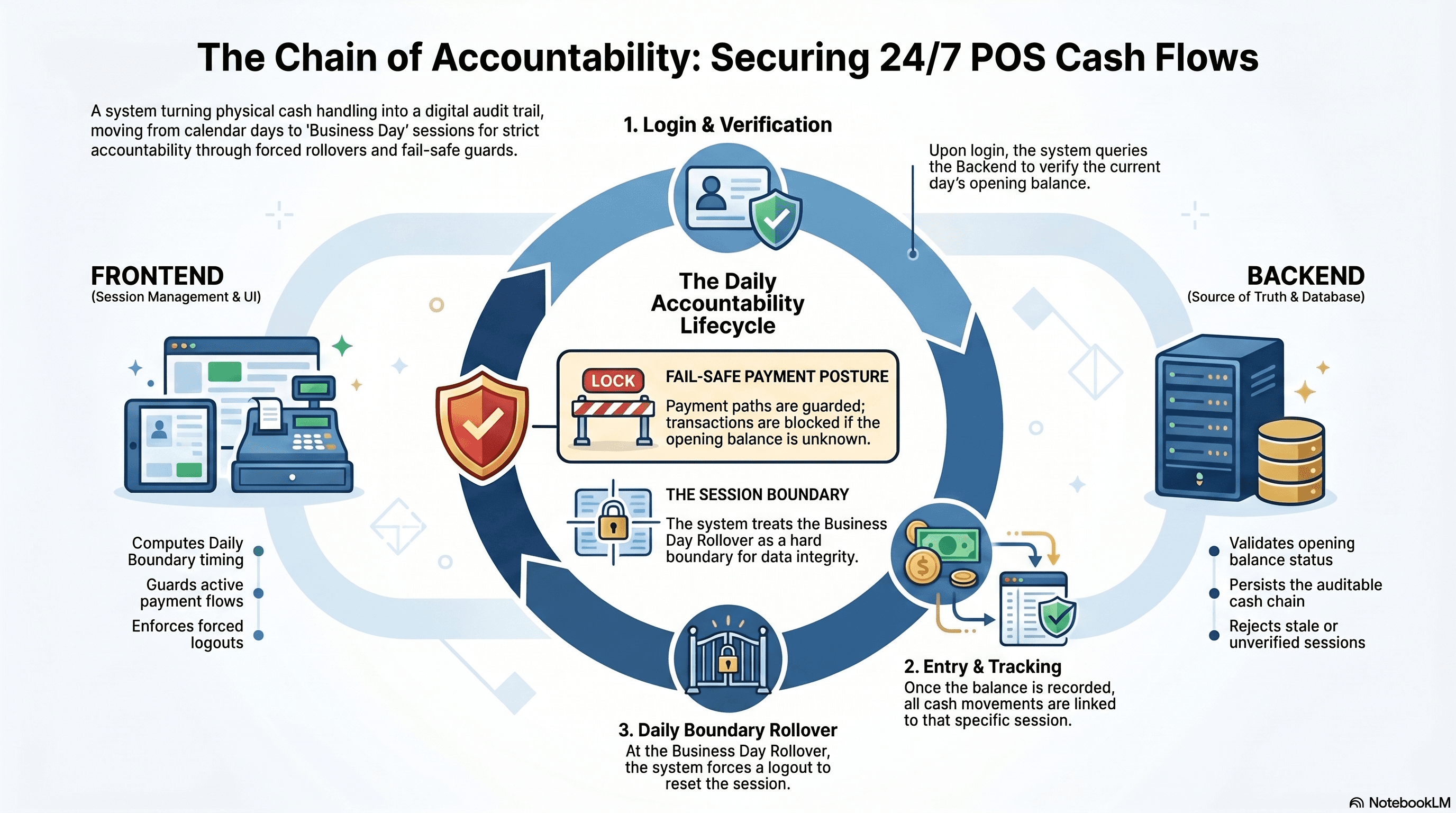
The frontend may manage the session. The backend is the source of truth for whether opening cash exists for the current business day.
That distinction matters more than it sounds.
Local browser state is fast and convenient for UX. But it should not become business authority. If the frontend trusted its own cached state, a POS could silently carry yesterday's opening balance into today's cash session — and the business would never know.
So I drew a clear boundary:
The frontend is allowed to:
- Compute the next configured business-day rollover
- Schedule a forced logout at that boundary
- Cache a resolved opening-cash state within the active browser session
- Guard payment flows if the opening balance is unresolved
The frontend is not allowed to:
- Trust stale local storage as proof of opening cash
- Infer the business session from the device's local timezone
- Skip the server check on a fresh login
- Continue cash or payment flows after the business-day boundary has passed
That boundary kept the system honest.
The Flow
At a high level, every login follows this path:
The user experience is simple. The engineering is in making it reliable.
Computing the Business Boundary Without Trusting the Device
The POS still needs the device clock for the current instant. But it should not use the device timezone to determine the business-day boundary.
The solution is to ask the JavaScript runtime to interpret the current instant in the configured operating timezone, explicitly:
const OPERATING_TIMEZONE = getConfiguredOperatingTimezone();
const BUSINESS_ROLLOVER_RULE = getConfiguredRolloverRule();

function getBusinessClockParts(date: Date) {
  const formatter = new Intl.DateTimeFormat('en-CA', {
    timeZone: OPERATING_TIMEZONE,
    year: 'numeric',
    month: '2-digit',
    day: '2-digit',
    hour: '2-digit',
    minute: '2-digit',
    second: '2-digit',
    hour12: false
  });

  return Object.fromEntries(
    formatter.formatToParts(date).map((part) => [part.type, part.value])
  );
}
The key detail is that timeZone comes from configuration. This tells the browser: do not use the device default, do not hardcode an offset, and do not assume every environment shares the same operating calendar.
Then the scheduler computes the next business-day boundary as a UTC timestamp and sets a single timer:
function scheduleRollover() {
  const nextRolloverUtcMs = getNextBusinessRolloverUtc({
    timeZone: OPERATING_TIMEZONE,
    rolloverRule: BUSINESS_ROLLOVER_RULE
  });
  const delayMs = Math.max(0, nextRolloverUtcMs - Date.now());

  setTimeout(() => {
    forceLogoutForBusinessDayRollover();
  }, delayMs);
}
One timer. One target instant. No polling. The browser calls back when the moment arrives.
Why Named Timezones Still Matter
Some operating regions change offsets during the year, and a hardcoded offset gets that wrong. The bugs that follow are subtle — a session can roll over early or late depending on the date. Using a named timezone from configuration delegates that responsibility to the browser's built-in timezone data, which handles daylight-saving transitions without exposing client-specific calendar details in the code.
Why Logout Is the Mechanism, Not a Modal
Early in the design, the obvious approach was: show the opening balance modal at the start of each business day.
That is not enough.
If a POS stays logged in indefinitely, yesterday's resolved cash state quietly becomes today's stale state. A cashier could continue processing cash transactions after the business-day boundary without starting a new drawer session. The data would look continuous when it should be separated.
So the business-day boundary has to be a session boundary.
At rollover, the system:
- Closes any active opening-cash dialogs
- Clears opening-cash session state
- Clears stale browser session data
- Redirects to the login screen
- Requires the next login to verify with the backend
The next business day cannot inherit the previous one's cash state. That is what makes the chain auditable.
The Wake-Up Problem
Kiosk devices are not normal desktop sessions.
Screens sleep. Browsers throttle JavaScript timers. A setTimeout scheduled for the business-day boundary may not fire exactly on time if the tab or device has been suspended.
So the timer alone is not sufficient.
I added explicit wake checks on browser focus and visibility events:
window.addEventListener('focus', checkRollover);
document.addEventListener('visibilitychange', () => {
  if (document.visibilityState === 'visible') {
    checkRollover();
  }
});

function checkRollover() {
  if (Date.now() >= scheduledRolloverUtcMs) {
    forceLogoutForBusinessDayRollover();
  } else {
    scheduleRollover();
  }
}
Two paths:
- Active browser: the timer fires at rollover.
- Sleeping browser: the first wake or focus event detects the missed rollover and logs out immediately.
The honest limitation: a web app cannot repaint itself while the browser is fully suspended. If a device sleeps through the rollover, the screen will visually show the old POS state until the browser wakes. That is an operational constraint, not a code problem. For stricter environments it can be paired with kiosk management tooling — scheduled browser reloads or device reboots shortly after the configured rollover window.
Storage: Cache, Not Truth
Browser storage plays a supporting role, not a governing one.
The session state looks roughly like this:
{
  "branchId": "current-location",
  "businessDate": "current-business-session",
  "nextRolloverUtcMs": "computed-utc-timestamp",
  "resolved": true
}
sessionStorage can restore the opening-cash state after a page refresh within the same POS session. That is a useful UX optimization — it avoids an unnecessary server round-trip during normal operation.
But it is never treated as proof.
On a fresh login, the backend check runs regardless of what is in storage. The cache speeds up the happy path. The backend decides what is true.
Guarding the Payment Flows
The opening-balance check cannot live only at login.
Startup requests fail. Browsers cancel in-flight requests during redirects. Networks drop at inconvenient moments. A user can land in a payment screen with an unresolved opening-cash state for reasons that have nothing to do with bad intent.
So every payment path has a guard:
function ensureOpeningBalanceReady(): Observable<boolean> {
  if (hasResolvedOpeningCashForActiveSession()) {
    return of(true);
  }

  return checkOpeningCashWithBackend().pipe(
    switchMap((status) => {
      if (status.complete) {
        markOpeningCashResolved(status.businessDate);
        return of(true);
      }

      if (status.requiresOpeningCash) {
        openOpeningBalanceModal();
        return of(false);
      }

      return throwError(() => new Error('Unable to verify opening cash'));
    })
  );
}
Payment flows then compose on top of this:
ensureOpeningBalanceReady().subscribe({
  next: (ready) => {
    if (!ready) return;
    continuePayment();
  },
  error: () => {
    showWarning('Opening balance could not be verified');
  }
});
The posture is fail-safe, not optimistic:
- Opening cash resolved → continue
- Opening cash missing → require it
- Cannot verify → block, do not assume
That is the difference between a convenience feature and an accountability feature.
The Race Condition I Almost Missed
This one is worth its own section because I think it is underappreciated in frontend work generally.
Consider this sequence:
- The user is logged in.
- An opening-cash request is still in flight.
- The user logs out.
- The user logs back in quickly.
- The old request completes and resolves successfully.
Without protection, that late response would write resolved state into the new session — based on a check that ran before logout. The new session would appear to have valid opening cash without having actually verified it.
The fix is to treat logout as a hard lifecycle boundary:
let openingCashLifecycleVersion = 0;

function resetOpeningCashStateForLogout() {
  openingCashLifecycleVersion++;
  clearOpeningCashSession();
  clearInFlightRequestCache();
}

function resolveOpeningCash() {
  const version = openingCashLifecycleVersion;

  return checkOpeningCashWithBackend().pipe(
    map((status) => {
      if (version !== openingCashLifecycleVersion) {
        return false; // stale response, discard it
      }

      return applyOpeningCashStatus(status);
    })
  );
}
Logout increments the version. Any async callback from a previous version is silently discarded.
This is a small pattern. But stale async responses are one of the most common sources of incorrect state in frontend applications, and they are especially dangerous in systems where the state has operational consequences — like cash accountability.
Where This Sits in the Bigger Picture
The cash accountability system does not run in isolation. It is one workflow layered on top of a broader pattern I keep reaching for on any kiosk/POS fleet: a write path that assumes the network will fail and stays correct anyway.
Device UI
The layer a kiosk operator or cashier actually touches. It has to stay responsive even mid-transaction, so nothing here blocks on a network round-trip.
- Renders instantly from local state, never waits on the backend to paint
- Owns the "is this device online" signal that every other layer reads
- Every write goes to the local cache first, network second
The opening-cash check, the business-day rollover, and the lifecycle-versioned async guard above are all specific applications of the same rule that shapes every layer in that diagram: the device can render instantly and cache locally, but it never gets to decide what is true. That authority stays with the backend, and anything written in between is queued, retried, and recoverable rather than trusted on faith.
What This Gave the Business
The feature changed what the business could see and say about its cash.
Before:
Cash payments happened.
The business counted the drawer at the end of the day.
Discrepancies were hard to explain.
After:
Every business day starts with a recorded opening balance.
Every cash movement contributes to an expected drawer amount.
The next business day cannot silently inherit the previous one's state.
When a drawer does not match, there is a chain of data to investigate.
This is not about distrusting staff. It is about building a process where the numbers can be explained calmly, not just debated. Good operational software reduces ambiguity — that is most of what it is for.
What I Would Build Next
If I were hardening this further, three things would be on the list:
An idle screen for POS devices — hide stale operational UI after long periods of inactivity, and check rollover status on the first interaction before allowing the session to continue.
A capture-phase interaction guard — intercept the first tap or keypress after a rollover has been detected, force logout before the interaction reaches any order or payment screen.
Operational scheduling — a scheduled browser reload or device reboot shortly after the configured rollover window, managed at the kiosk level rather than the web app level. The application can enforce correctness once it is running. Device management can help ensure it actually wakes up on time.
Closing Thought
Cash handling is one of those areas where software has to meet the physical world, and the physical world does not cooperate with assumptions.
The system cannot see the notes and coins. It needs a process. It needs an accountable starting point. It needs a business-day boundary. It needs to fail safely when its own state is unclear.
What made this feature genuinely interesting was not the modal — it was everything the modal depended on: a correct operating-calendar model, a session boundary with real enforcement, a fail-safe payment guard, and a small lifecycle versioning trick to keep async responses from haunting the wrong session.
Building something that handles money demands that kind of depth. You do not get to be optimistic.