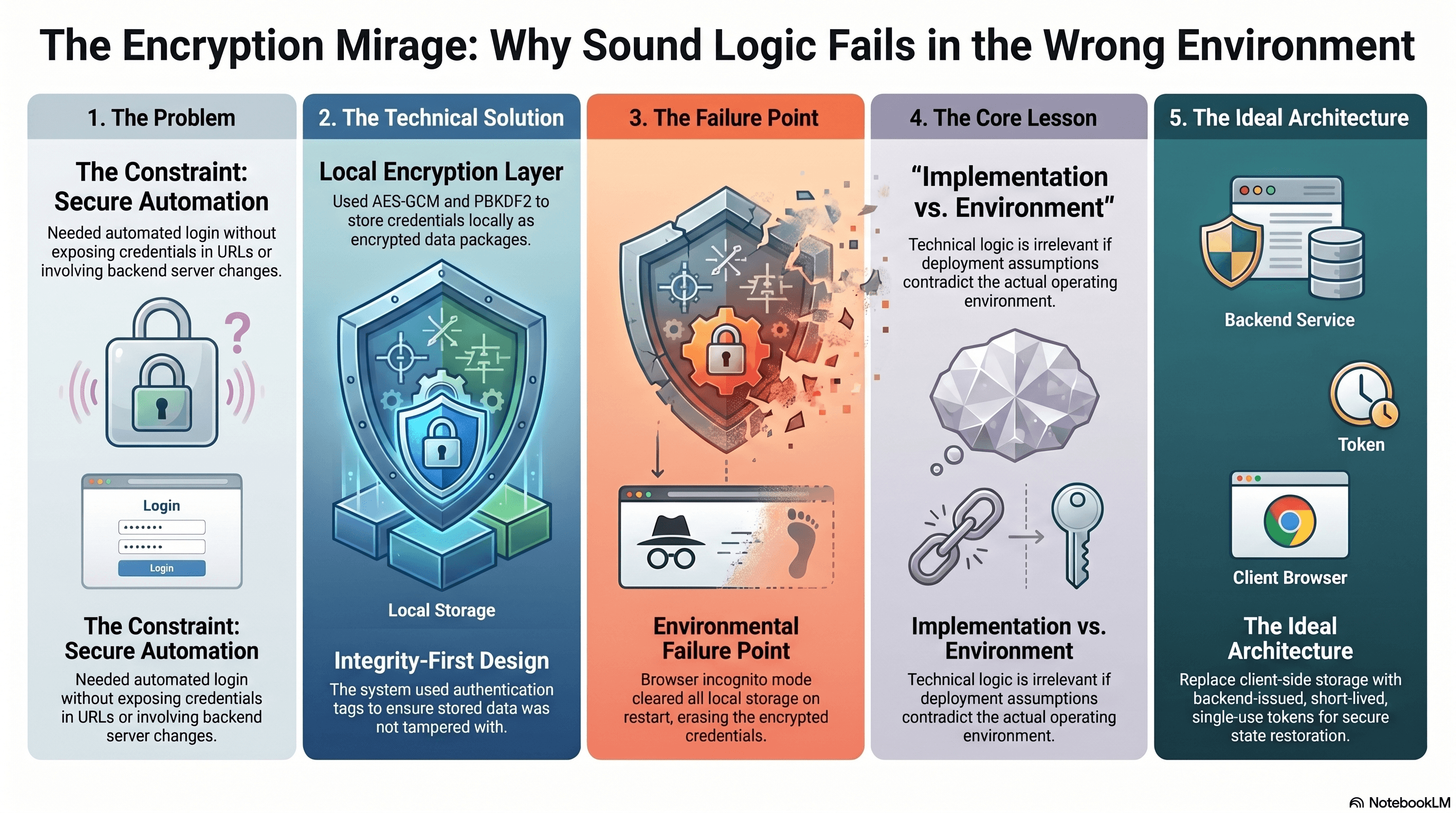
Every time a POS device restarted, someone had to log in again.
That sounds trivial until the same action has to be repeated across a managed fleet. After rollouts, browser restarts, remote support sessions, or device maintenance, the support team would work through the same login sequence again and again:
- Open the POS login page.
- Enter the primary account credentials.
- Continue to the location login screen.
- Select the assigned location.
- Enter the local access code.
- Reach the POS home page.
The ask was reasonable: give support a single URL they could paste after a restart to restore the login state automatically, without putting credentials in front of them.
Simple to describe. Interestingly constrained to build.
The Constraints That Shaped Everything
Before writing any code, the situation had three hard limits.
No backend work was available. No new API, no server-issued tokens, no device registry, no credential vault. Whatever the solution was, it had to live entirely on the frontend.
Credentials could not go in the URL. The obvious shortcut:
/[email protected]&password=secret&pin=1234
was off the table. URLs leak. They appear in browser history, server logs, proxy logs, monitoring tools, screenshots, and support tickets. Putting real credentials there would trade one operational inconvenience for a much worse security problem.
The existing login flow had to stay intact. No separate authentication path. The auto-login feature would have to reuse the same Angular login code that manual login used.
So the challenge was: let each device remember its own credentials and replay the login automatically, without the credentials sitting in the URL, and without any server involvement.
The Design Idea
I broke the problem into two questions.
Where should the credentials come from during auto-login? There were only three realistic options: put them in the URL, fetch them from the backend, or store them on the device itself. The first was unsafe. The second was out of scope. That left device-local storage as the only viable path inside the constraints.
If credentials live on the device, how do we avoid storing them as plaintext? Plain localStorage would be technically functional but trivially inspectable. Anyone with DevTools open could read the credentials in seconds.
That is where AES-GCM came in.
The idea: let each POS device remember its own login package, but encrypt it before storing. The URL becomes nothing more than a trigger:
/login?autologin=true
The credentials stay on the device, stored as encrypted data that the app can reconstruct at login time.
URL      -> trigger only, no credentials
Device   -> encrypted credential package
App      -> decrypts locally, calls existing login flow
How It Worked Technically
What Gets Stored
After a successful manual login, the app encrypts the login payload and saves a JSON package to localStorage:
{
  "version": 1,
  "createdAt": "created-timestamp",
  "salt": "base64-salt",
  "iv": "base64-iv",
  "data": "base64-encrypted-login-payload"
}
The actual credentials live inside the encrypted data field. The salt and iv are stored alongside it in plaintext, which is normal and intentional.
PBKDF2: Deriving the Key
The encryption key is not stored directly. Instead, it is rebuilt each time using PBKDF2, a key derivation function that takes key material and a salt, runs it through many hash iterations, and produces an AES-compatible key.
app key material + salt
        |
        v
     PBKDF2
        |
        v
  AES-GCM key
The salt is random data generated at encryption time. Its job is to make sure the same payload encrypted twice produces different ciphertext. The salt is not secret. It just has to be saved so the same key can be reconstructed at decryption time.
AES-GCM: Encrypting the Credentials
AES-GCM needs two things beyond the key: the data to encrypt and an IV, or initialization vector. The IV is random data that ensures encrypting the same payload with the same key does not produce identical output each time.
AES-GCM key + IV + login payload
        |
        v
 encrypted data + authentication tag
Like the salt, the IV is not secret. It just needs to be stored alongside the encrypted data so it can be passed back in during decryption.
The meaningful thing AES-GCM adds beyond basic encryption is integrity. During encryption it produces an authentication tag. During decryption it recomputes that tag. If the stored data has been modified in any way, the tags will not match and decryption will throw an error. Simple tampering does not produce garbage output or forged credentials. It fails loudly.
This integrity check is built into AES-GCM. The app does not have to implement it manually.
The Auto-Login Flow
After a device restart, support pastes:
/login?autologin=true
The Angular app then:
- Detects the
autologin=truequery parameter. - Immediately removes it from the URL with
history.replaceStateso it does not linger in browser history. - Reads the encrypted package from
localStorage. - Uses the stored salt to rebuild the AES key via PBKDF2.
- Uses the stored IV to decrypt the login payload via AES-GCM.
- Passes the decrypted values to the same login method that manual login uses.
- Navigates to the POS home page.
No new authentication path. No new API. The same login logic, just with credentials sourced from the device rather than typed by a human.
What This Protected Against, And What It Did Not
This is the part I want to be direct about, because the security case for client-side encryption is often overstated.
What the design protected against:
- Plaintext credentials sitting readable in
localStorage - Credentials being placed in the URL and exposed in logs
- Casual browser-storage inspection revealing login details
- Simple payload tampering causing silent corruption
What it did not protect against:
- A technical user with full device access who can inspect the Angular bundle, reverse the key derivation, and decrypt the payload
- Malware running on the POS device
- Browser storage being cleared or extracted
Client-side encryption shifts the effort required to extract credentials, but it does not eliminate the risk. The app code is always accessible to someone with enough access and motivation. For controlled internal hardware operated by a trusted support team, that tradeoff can be reasonable. For a public-facing consumer product, it would not be.
Why It Failed
The design depended on one assumption: that browser storage would survive a restart.
That assumption was never verified against the actual device configuration.
When we checked the production environment, the devices were running in a privacy-preserving browser mode that discards local storage when the session ends. After a restart, the encrypted package was simply gone.
Device restarts
        |
        v
Browser clears localStorage
        |
        v
Encrypted package does not exist
        |
        v
Auto-login has nothing to decrypt
        |
        v
Support logs in manually again
The encryption was sound. The storage layer was not.
This is the kind of failure that does not announce itself during design. The technical approach was coherent. The cryptographic choices were appropriate. The gap was an environmental assumption that was never validated, and in production those are often the failures that matter most.
What the Right Solution Looks Like
The fundamental limitation of a frontend-only design here is that the device cannot securely persist a secret across a full browser reset without some involvement from a system outside the browser.
The correct architecture is backend-supported:
- Register each POS device server-side and associate it with its allowed location context.
- When support needs to trigger auto-login, generate a short-lived, single-use token tied to that device.
- Support pastes a URL containing only the token.
- The Angular app sends the token to the backend.
- The backend validates the token, creates the appropriate session, and immediately invalidates the token.
This keeps credentials off the URL, off the client, and out of browser storage entirely. The token is useless after one use. The device does not need to remember anything sensitive. And the login survives any browser mode.
It requires backend work. But for a managed fleet handling real operational credentials, that is the appropriate investment.
Closing Thought
The AES-GCM design was a coherent answer to the constraints I was given. Within those constraints — no backend, no URL exposure, existing login flow — it was the right call. The cryptographic choices held up. The flow was clean.
What it could not survive was an environmental assumption that turned out to be wrong.
That is worth remembering as a general principle. Implementation correctness and environmental correctness are different things, and production systems fail at the boundary between them more often than they fail in the logic itself.
The honest version of every engineering post-mortem usually sounds something like: the code did exactly what we designed it to do; we just designed it for a world that did not exist.